Day 5 -- HTTP Gateway
Your trip planner works from the terminal via meshctl call. But real users need an HTTP API. Today you'll wrap the planner in a FastAPI gateway -- a thin REST endpoint that bridges HTTP requests to mesh tool calls. By the end of Part 1, you'll have a complete, callable trip planning API.
What we're building today
graph LR
    U[User] -->|"POST /plan"| GW[gateway]
    GW -->|"trip_planning"| PL[planner-agent]
    PL -->|"+claude"| CP[claude-provider]
    PL -.->|failover| OP[openai-provider]
    PL ==>|tier-1| UPA[user-prefs-agent]
    CP -.->|tier-2| FA[flight-agent]
    CP -.->|tier-2| HA[hotel-agent]
    CP -.->|tier-2| WA[weather-agent]
    CP -.->|tier-2| PA[poi-agent]
    FA -->|depends on| UPA
    PA -->|depends on| WA

    style U fill:#555,color:#fff
    style GW fill:#e67e22,color:#fff
    style PL fill:#9b59b6,color:#fff
    style CP fill:#9b59b6,color:#fff
    style OP fill:#9b59b6,color:#fff
    style FA fill:#4a9eff,color:#fff
    style PA fill:#4a9eff,color:#fff
    style UPA fill:#1a8a4a,color:#fff
    style WA fill:#1a8a4a,color:#fff
    style HA fill:#1a8a4a,color:#fff
Nine agents. Everything from Day 4 (blue, green, purple) plus the gateway in orange. The user sends an HTTP request to the gateway. The gateway calls the planner through mesh dependency injection. The planner calls the LLM provider, which calls the tool agents. The gateway doesn't know any of this -- it just calls plan_trip and returns the result.
Today has four parts:
- Build the gateway -- a FastAPI app with
@mesh.route - Start the gateway -- add it to your running mesh
- Call the API --
curlthe gateway and compare withmeshctl call - Walk the trace -- see the full call tree from HTTP to tool agents
Part 1: Build the gateway
Scaffold the gateway
Replace the generated main.py with:
import mesh
from fastapi import FastAPI, Request
from mesh.types import McpMeshTool

app = FastAPI(title="Trip Planner Gateway", version="1.0.0")


@app.get("/health")
async def health():
    """Health check endpoint."""
    return {"status": "healthy"}


@app.post("/plan")
@mesh.route(dependencies=["trip_planning"])
async def plan_trip(request: Request, plan_trip: McpMeshTool = None):
    """Bridge HTTP to the mesh planner."""
    body = await request.json()
    if not plan_trip:
        return {"error": "trip_planning capability unavailable"}
    result = await plan_trip(
        destination=body["destination"],
        dates=body["dates"],
        budget=body["budget"],
    )
    return {"result": result}


if __name__ == "__main__":
    import uvicorn

    uvicorn.run(app, host="0.0.0.0", port=8080, log_level="info")
That's the entire gateway. Three imports, a health check, and one route handler.
How @mesh.route works
@mesh.route is a decorator for FastAPI handlers that injects mesh capabilities as function parameters -- the same dependency injection that @mesh.tool uses, but for HTTP endpoints instead of MCP tools.
@app.post("/plan")
@mesh.route(dependencies=["trip_planning"])
async def plan_trip(request: Request, plan_trip: McpMeshTool = None):
    """Bridge HTTP to the mesh planner."""
    body = await request.json()
    if not plan_trip:
        return {"error": "trip_planning capability unavailable"}
    result = await plan_trip(
        destination=body["destination"],
        dates=body["dates"],
        budget=body["budget"],
    )
    return {"result": result}
The key line is @mesh.route(dependencies=["trip_planning"]). This tells mesh: "Before this handler runs, resolve the trip_planning capability and inject it as a callable." The parameter name plan_trip matches the tool name registered by planner-agent. The type hint McpMeshTool tells mesh to inject a tool proxy.
The handler is five lines of code:
- Parse the JSON body.
- Check that the tool was injected (defensive -- it should always resolve if the planner is running).
- Call the injected tool with the request parameters.
- Return the result.
The gateway doesn't import the planner. It doesn't know the planner's URL. It declares a dependency on trip_planning, and mesh injects a callable. When you add new tool agents on Day 6, the gateway won't change -- it calls the planner, and the planner discovers new tools automatically.
Part 2: Start the gateway
Your eight agents from Day 4 should still be running. Add the gateway:
Check the mesh:
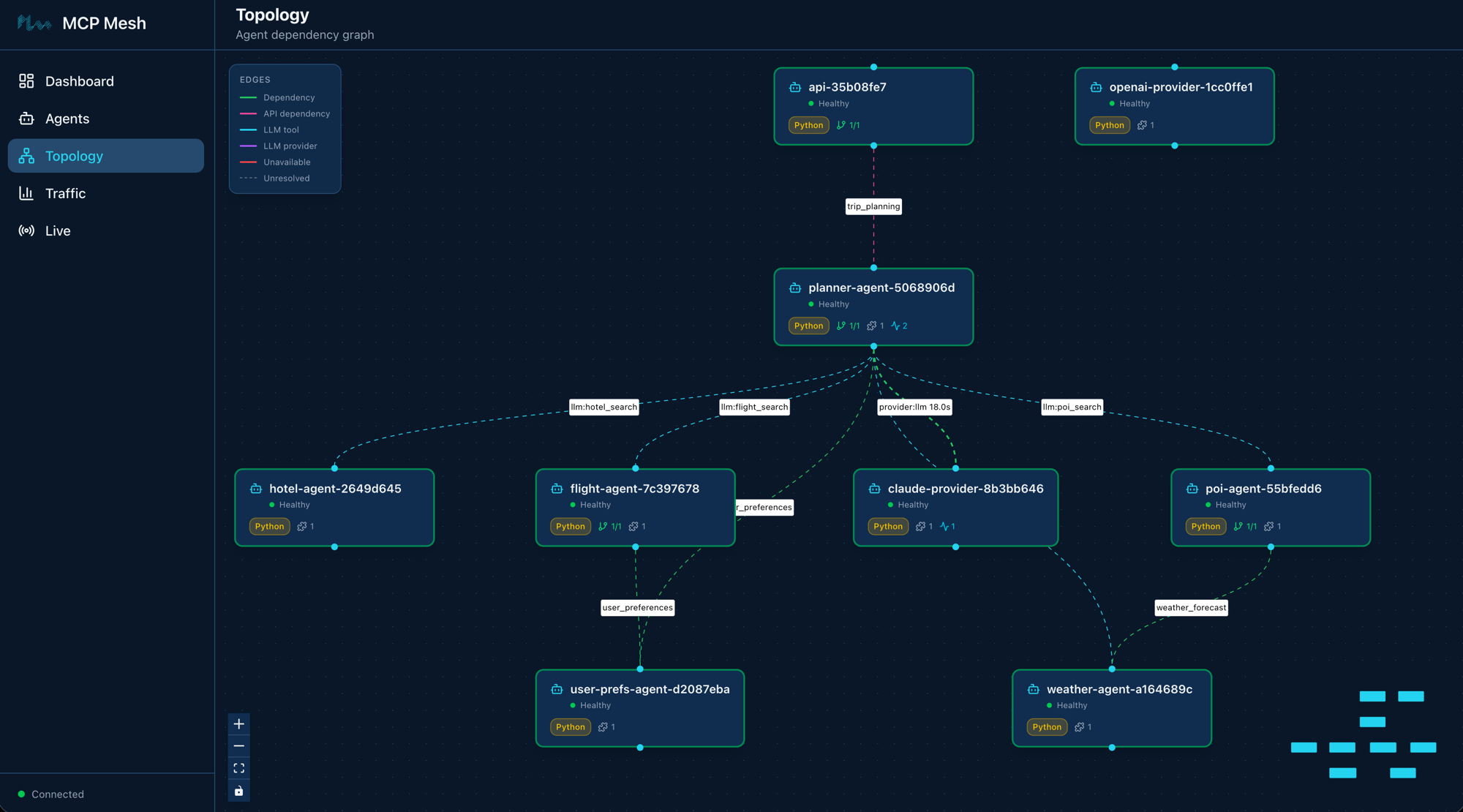
Registry: running (http://localhost:8000) - 9 healthy

NAME                        RUNTIME   TYPE    STATUS    DEPS   ENDPOINT           AGE   LAST SEEN
claude-provider-0a89e8c6    Python    Agent   healthy   0/0    10.0.0.74:49486    10m   2s
flight-agent-a939da4b       Python    Agent   healthy   1/1    10.0.0.74:49480    10m   2s
gateway-7b3f2e91            Python    API     healthy   1/1    10.0.0.74:8080     4s    4s
hotel-agent-9932ac09        Python    Agent   healthy   0/0    10.0.0.74:49482    10m   2s
openai-provider-40a5c637    Python    Agent   healthy   0/0    10.0.0.74:49485    10m   2s
planner-agent-fb07b918      Python    Agent   healthy   1/1    10.0.0.74:49484    10m   2s
poi-agent-97bd9fcc          Python    Agent   healthy   1/1    10.0.0.74:49481    10m   2s
user-prefs-agent-87506c4a   Python    Agent   healthy   0/0    10.0.0.74:49479    10m   2s
weather-agent-a6f7ea5e      Python    Agent   healthy   0/0    10.0.0.74:49483    10m   2s
Nine agents. The gateway shows type API (not Agent) and its dependency 1/1 resolved -- it found the trip_planning capability from planner-agent.
List the tools:
TOOL                      AGENT                       CAPABILITY           TAGS
--------------------------------------------------------------------------------------------
claude_provider           claude-provider-0a89e8c6    llm                  claude
flight_search             flight-agent-a939da4b       flight_search        flights,travel
get_user_prefs            user-prefs-agent-87506c4a   user_preferences     preferences,travel
get_weather               weather-agent-a6f7ea5e      weather_forecast     weather,travel
hotel_search              hotel-agent-9932ac09        hotel_search         hotels,travel
openai_provider           openai-provider-40a5c637    llm                  openai,gpt
plan_trip                 planner-agent-fb07b918      trip_planning        planner,travel,llm
search_pois               poi-agent-97bd9fcc          poi_search           poi,travel

8 tool(s) found
The gateway doesn't appear in the tool list -- it doesn't expose any tools. It consumes the trip_planning capability via @mesh.route, not @mesh.tool. This is the difference between an API agent and a tool agent: API agents are HTTP entry points into the mesh, not MCP tool providers.
Part 3: Call the API
Via curl
$ curl -s -X POST http://localhost:8080/plan \
    -H "Content-Type: application/json" \
    -d '{"destination":"Kyoto","dates":"June 1-5, 2026","budget":"$2000"}'
{
  "result": "## Kyoto Trip Itinerary: June 1-5, 2026\n\n**Budget: $2,000**\n\n### Day 1 (June 1) - Arrival & Eastern Kyoto\n\n**Morning:**\n- Arrive via SQ017 ($901) — preferred airline per your preferences\n- Check into Sakura Inn ($95/night, 3-star) — meets your minimum star rating\n\n**Afternoon:**\n- Visit Fushimi Inari Shrine (cultural — matches your interests)\n- Walk the thousand torii gates trail\n\n**Evening:**\n- Dinner at Nishiki Market area — street food tour (food interest)\n- Explore Gion district\n\n..."
}
A full trip itinerary, personalized with the user's preferences (preferred airlines, hotel stars, interests), built from real data returned by your tool agents.
Via meshctl
For comparison, the same call through meshctl:
$ meshctl call plan_trip '{"destination":"Kyoto","dates":"June 1-5, 2026","budget":"$2000"}' --trace
Same result, different transport. The curl path goes user -> gateway -> planner -> LLM -> tools. The meshctl path goes user -> registry -> planner -> LLM -> tools. Both end up at the same planner with the same tools.
Part 4: Walk the trace
If you called via meshctl --trace, you got a trace ID. View it:
Call Tree for trace a4e8b2c91f7d3e56a8120900037f48d1
════════════════════════════════════════════════════════════

└─ plan_trip (planner-agent) [17842ms] ✓
   ├─ get_user_prefs (user-prefs-agent) [1ms] ✓
   └─ claude_provider (claude-provider) [17803ms] ✓
      ├─ flight_search (flight-agent) [15ms] ✓
      │  └─ get_user_prefs (user-prefs-agent) [0ms] ✓
      ├─ hotel_search (hotel-agent) [1ms] ✓
      ├─ get_weather (weather-agent) [0ms] ✓
      ├─ search_pois (poi-agent) [22ms] ✓
      │  └─ get_weather (weather-agent) [0ms] ✓
      └─ get_weather (weather-agent) [0ms] ✓

────────────────────────────────────────────────────────────
Summary: 14 spans across 7 agents | 17.84s | ✓
The full call tree: planner prefetches user preferences (tier-1), calls Claude (who calls flight, hotel, weather, and POI tools during its reasoning loop), and returns the assembled itinerary. Every hop is a separate span with sub-millisecond mesh overhead.
The thin wrapper pattern
The gateway has no business logic. It translates HTTP to mesh and mesh to HTTP. That's it. When you add a new tool agent on Day 6, the gateway doesn't change -- it calls the planner, and the planner discovers new tools automatically. If you need a second endpoint (say, POST /flights for direct flight search), you add one @mesh.route handler. The gateway stays thin.
Cross-language gateway swap
Choose your adventure
One of mesh's strengths is that any agent -- including the gateway -- can be swapped for a different language without changing anything else. The planner, providers, and tool agents don't care what language the gateway is written in.
Want to see this in action? Pick one:
- Build the gateway in Spring Boot -- same REST endpoints, same mesh DI, Java instead of Python
- Build the gateway in Express -- same endpoints, TypeScript
- Skip -- continue to Day 6 with the FastAPI gateway
Stop the Python gateway with meshctl stop gateway, build the replacement in your language of choice, and start it with meshctl start. The rest of the mesh keeps running.
Part 1 complete
That's Part 1. You have a working trip planner: nine agents, two LLM providers with automatic failover, dependency injection across tools and providers, prompt templates, distributed traces, and an HTTP API. All of it running locally with meshctl start and an observability stack in Docker.
Part 2 grows this into something production-shaped -- chat history, specialist committees, Docker Compose packaging, Kubernetes deployment, and a full observability walkthrough.
Leave it running
Your nine agents are running in watch mode. On Day 6 you'll add Redis-backed chat history. No need to stop between chapters.
Troubleshooting
Port 8080 already in use. The gateway defaults to port 8080. If another service is using that port, either stop the conflicting service or change the port in gateway/main.py:
FastAPI not installed. The gateway requires fastapi and uvicorn. If you see ModuleNotFoundError: No module named 'fastapi', install them in your venv:
Gateway starts but curl fails. Check three things:
- The gateway is healthy:
meshctl listshould showgatewaywith statushealthyand deps1/1. - You're using the correct port: check the
meshctl listoutput for the gateway's endpoint. - The planner is running: the gateway depends on
trip_planning. If the planner is down, the gateway starts but tool injection fails.
curl returns an error response. If the response is {"error": "trip_planning capability unavailable"}, the planner hasn't registered yet or its dependency on llm hasn't resolved. Check meshctl list -- the planner should show healthy with deps 1/1. Also verify your LLM API keys are set (ANTHROPIC_API_KEY or OPENAI_API_KEY).
curl returns empty or truncated response. The LLM is still generating. Trip planning calls take 15-20 seconds depending on the LLM provider. If curl times out, increase the timeout:
Recap
You wrapped your trip planner in a five-line FastAPI handler, bridging HTTP to mesh with @mesh.route. The gateway is a thin entry point -- no business logic, no planner imports, no hardcoded URLs. It declares what it needs (trip_planning), mesh injects a callable, and the handler forwards the request. Two transports (curl and meshctl) reach the same planner through different paths.
See also
meshctl man fastapi-- the full@mesh.routereference, including multiple dependencies, middleware configuration, and CORS setupmeshctl man decorators-- the complete decorator referencemeshctl man capabilities-- capability selectors and dependency resolution
Next up
Day 6 adds Redis-backed chat history so users can iterate on their trip plans across multiple turns.