Day 4 -- Multiple Providers and Dependency Tiers
Your planner works, but it's locked to one LLM provider and generates plans from imagination. Today you'll add a second LLM provider, introduce preference-based routing with automatic failover, and connect the planner to your tool agents so it plans with real flight and hotel data.
What we're building today
graph LR
    subgraph Providers
        CP[claude-provider]
        OP[openai-provider]
    end

    subgraph Tool Agents
        FA[flight-agent] -->|depends on| UPA[user-prefs-agent]
        PA[poi-agent] -->|depends on| WA[weather-agent]
        HA[hotel-agent]
    end

    PL[planner-agent] -.->|"+claude" preference| CP
    PL -.->|failover| OP
    PL ==>|tier-1 prefetch| UPA
    PL -.->|tier-2 LLM tools| FA
    PL -.->|tier-2 LLM tools| HA
    PL -.->|tier-2 LLM tools| WA
    PL -.->|tier-2 LLM tools| PA

    style FA fill:#4a9eff,color:#fff
    style PA fill:#4a9eff,color:#fff
    style UPA fill:#1a8a4a,color:#fff
    style WA fill:#1a8a4a,color:#fff
    style HA fill:#1a8a4a,color:#fff
    style CP fill:#9b59b6,color:#fff
    style OP fill:#9b59b6,color:#fff
    style PL fill:#9b59b6,color:#fff
Eight agents. The five tool agents you already know (blue and green), two LLM providers in purple (Claude and OpenAI), and the planner -- now connected to everything. The solid arrow is a tier-1 dependency (prefetched before the LLM call). The dashed arrows are tier-2 (tools the LLM discovers and calls during its reasoning loop).
Today has six parts:
- Add a second LLM provider -- wrap OpenAI as a mesh capability
- Provider tags and preference routing -- teach
+/-tag operators - Provider swap -- zero code changes -- stop Claude, watch failover
- Connect the planner to tool agents -- tier-1 prefetch and tier-2 tools
- Call the enhanced planner -- generate a plan with real data
- Walk the trace -- see the full call tree across all eight agents
Part 1: Add a second LLM provider
API keys required
You need both ANTHROPIC_API_KEY and OPENAI_API_KEY set in your environment. If you don't have an OpenAI key, create one here and export it: export OPENAI_API_KEY=sk-...
The OpenAI provider follows the exact same pattern as the Claude provider from Day 3. Same decorator, same zero-code body, different model string.
Scaffold the provider
$ meshctl scaffold --name openai-provider --agent-type llm-provider --model openai/gpt-4o-mini --port 9108
Replace the generated main.py with:
import mesh
from fastmcp import FastMCP

app = FastMCP("OpenAI Provider")


@mesh.llm_provider(
    model="openai/gpt-4o-mini",
    capability="llm",
    tags=["openai", "gpt"],
    version="1.0.0",
)
def openai_provider():
    """Zero-code LLM provider. Wraps the OpenAI API as a mesh capability."""
    pass


@mesh.agent(
    name="openai-provider",
    version="1.0.0",
    description="TripPlanner OpenAI LLM provider (Day 4)",
    http_port=9108,
    enable_http=True,
    auto_run=True,
)
class OpenaiProviderAgent:
    pass
The only differences from claude-provider:
model="openai/gpt-4o-mini"-- LiteLLM routes this to the OpenAI API using yourOPENAI_API_KEY.tags=["openai", "gpt"]-- different tags so consumers can distinguish between providers.
The capability name is still "llm" -- both providers advertise the same capability. This is how the mesh supports multiple providers for the same function.
Start the provider
Check the mesh:
Registry: running (http://localhost:8000) - 8 healthy

NAME                        RUNTIME   TYPE    STATUS    DEPS   ENDPOINT           AGE   LAST SEEN
claude-provider-0a89e8c6    Python    Agent   healthy   0/0    10.0.0.74:49486    1m    2s
flight-agent-a939da4b       Python    Agent   healthy   1/1    10.0.0.74:49480    1m    2s
hotel-agent-9932ac09        Python    Agent   healthy   0/0    10.0.0.74:49482    1m    2s
openai-provider-40a5c637    Python    Agent   healthy   0/0    10.0.0.74:49485    4s    4s
planner-agent-fb07b918      Python    Agent   healthy   1/1    10.0.0.74:49484    1m    2s
poi-agent-97bd9fcc          Python    Agent   healthy   1/1    10.0.0.74:49481    1m    2s
user-prefs-agent-87506c4a   Python    Agent   healthy   0/0    10.0.0.74:49479    1m    2s
weather-agent-a6f7ea5e      Python    Agent   healthy   0/0    10.0.0.74:49483    1m    2s
Eight agents. List the tools:
TOOL                      AGENT                       CAPABILITY           TAGS
--------------------------------------------------------------------------------------------
claude_provider           claude-provider-0a89e8c6    llm                  claude
flight_search             flight-agent-a939da4b       flight_search        flights,travel
get_user_prefs            user-prefs-agent-87506c4a   user_preferences     preferences,travel
get_weather               weather-agent-a6f7ea5e      weather_forecast     weather,travel
hotel_search              hotel-agent-9932ac09        hotel_search         hotels,travel
openai_provider           openai-provider-40a5c637    llm                  openai,gpt
plan_trip                 planner-agent-fb07b918      trip_planning        planner,travel,llm
search_pois               poi-agent-97bd9fcc          poi_search           poi,travel

8 tool(s) found
Two tools with capability llm -- claude_provider and openai_provider. Both are available. Right now, if the planner asks for {"capability": "llm"}, the registry picks one at random. You need a way to express a preference.
Part 2: Provider tags and preference routing
MCP Mesh tags support three operators for consumer-side selection:
| Prefix | Meaning | Example |
|---|---|---|
| (none) | Required | "api" -- must have this tag |
+ | Preferred | "+claude" -- bonus if present |
- | Excluded | "-deprecated" -- reject if present |
These operators are for the consumer side only (the provider= or dependencies= spec). When you declare tags on your provider, use plain strings without prefixes.
The matching algorithm:
- Filter -- remove candidates with any excluded tag (
-) - Require -- keep only candidates with all required tags (no prefix)
- Score -- add bonus points for each preferred tag (
+) present - Select -- return the highest-scoring candidate
Update the planner's provider selection
In Day 3, the planner used provider={"capability": "llm"} -- any provider will do. Now add a preference for Claude:
+claude means: "prefer a provider tagged claude. If one is available, route there. If not, fall back to any other provider with capability llm." The + makes it a preference, not a requirement -- the planner still works even if Claude is down.
Compare with alternatives:
"claude"(no prefix) -- required. If Claude is down, the call fails. No fallback."+claude"-- preferred. If Claude is down, route to the next available provider. Automatic failover."-gemini"-- excluded. Never route to a provider taggedgemini, even if it's the only one available.
Part 3: Provider swap -- zero code changes
This is where capability-based routing pays off. You'll call the planner three times, stopping and restarting Claude between calls, and watch the trace show different providers without changing a single line of code.
Call 1: Claude is preferred and available
$ meshctl call plan_trip '{"destination":"Kyoto","dates":"June 1-5, 2026","budget":"$2000"}' --trace
The response is a Kyoto itinerary. Check the trace:
Call Tree for trace 16f53c4095e481d329515600024f365c
════════════════════════════════════════════════════════════

└─ plan_trip (planner-agent) [18349ms] ✓
   ├─ get_user_prefs (user-prefs-agent) [1ms] ✓
   └─ claude_provider (claude-provider) [18308ms] ✓
      ├─ search_pois (poi-agent) [31ms] ✓
      │  └─ get_weather (weather-agent) [1ms] ✓
      ├─ get_weather (weather-agent) [0ms] ✓
      ├─ get_weather (weather-agent) [0ms] ✓
      └─ hotel_search (hotel-agent) [1ms] ✓

────────────────────────────────────────────────────────────
Summary: 11 spans across 6 agents | 18.35s | ✓
The planner routed to claude_provider. The tool calls you see under the provider (search_pois, get_weather, hotel_search) are tier-2 calls -- Claude decided to call those tools during its reasoning loop. More on that in Part 4.
Call 2: Stop Claude, watch failover
Now call the planner again. Same code, same arguments, same mesh:
$ meshctl call plan_trip '{"destination":"Tokyo","dates":"June 10-14, 2026","budget":"$3000"}' --trace
The response is a Tokyo itinerary -- generated by GPT, not Claude. Check the trace:
Call Tree for trace 2c71f26f5df8bbe8efbdb36f4ddbbea8
════════════════════════════════════════════════════════════

└─ plan_trip (planner-agent) [15963ms] ✓
   ├─ get_user_prefs (user-prefs-agent) [0ms] ✓
   └─ openai_provider (openai-provider) [15928ms] ✓
      ├─ flight_search (flight-agent) [22ms] ✓
      │  └─ get_user_prefs (user-prefs-agent) [0ms] ✓
      ├─ hotel_search (hotel-agent) [0ms] ✓
      └─ search_pois (poi-agent) [12ms] ✓
         └─ get_weather (weather-agent) [0ms] ✓

────────────────────────────────────────────────────────────
Summary: 12 spans across 7 agents | 15.96s | ✓
openai_provider (openai-provider). Same planner code, same tools, different LLM. No code change, no config change, no restart. The registry saw that Claude was down, found another healthy provider with capability llm, and routed there.
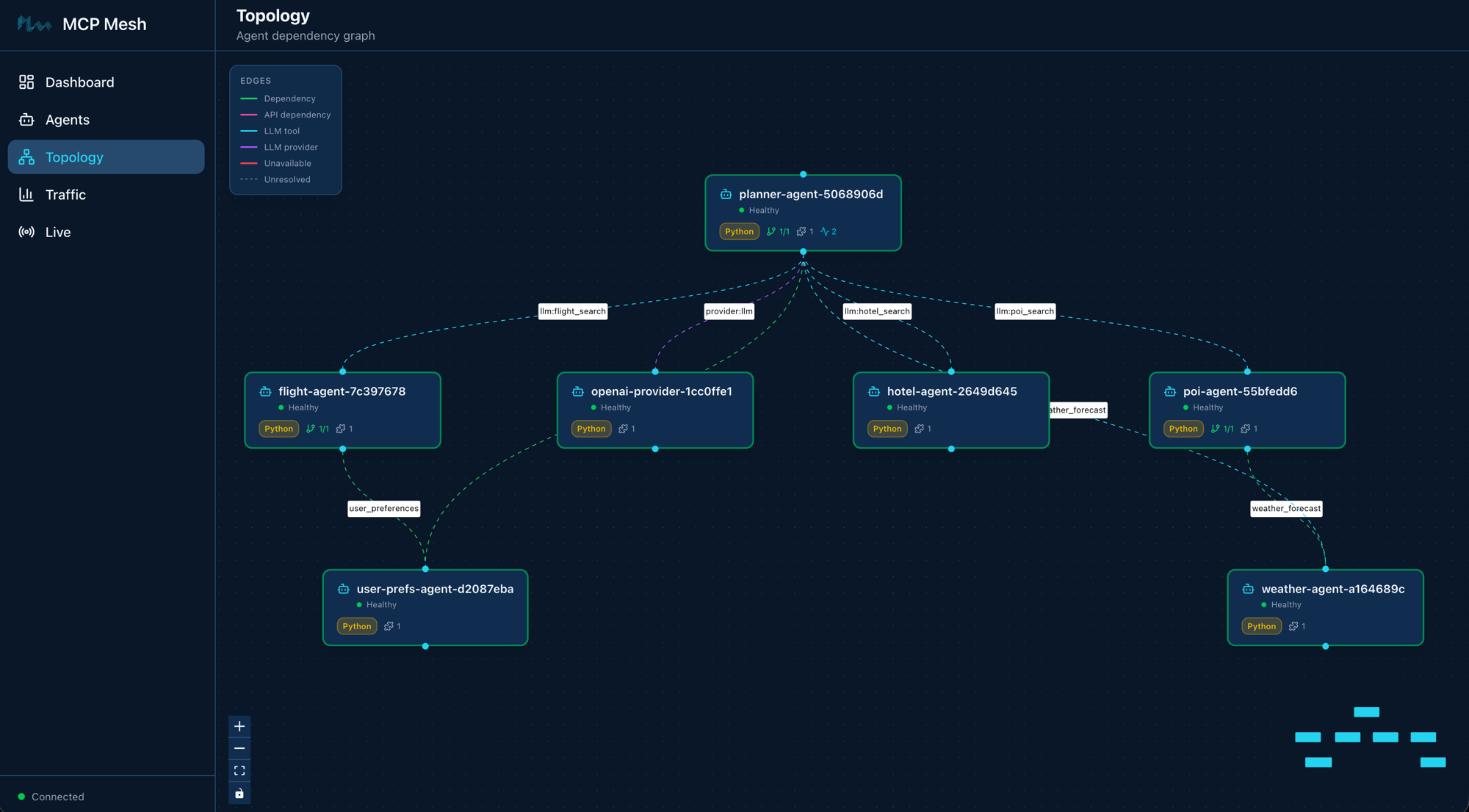
Call 3: Restart Claude, verify preference
Wait a few seconds for registration, then call again:
$ meshctl call plan_trip '{"destination":"Osaka","dates":"June 20-22, 2026","budget":"$1500"}' --trace
Check the trace:
Call Tree for trace d208aeaebcc78ebfdaed968eebbeae28
════════════════════════════════════════════════════════════

└─ plan_trip (planner-agent) [18020ms] ✓
   ├─ get_user_prefs (user-prefs-agent) [0ms] ✓
   └─ claude_provider (claude-provider) [17984ms] ✓
      ├─ flight_search (flight-agent) [13ms] ✓
      │  └─ get_user_prefs (user-prefs-agent) [0ms] ✓
      ├─ get_weather (weather-agent) [0ms] ✓
      ├─ search_pois (poi-agent) [19ms] ✓
      │  └─ get_weather (weather-agent) [0ms] ✓
      └─ hotel_search (hotel-agent) [0ms] ✓

────────────────────────────────────────────────────────────
Summary: 18 spans across 7 agents | 18.02s | ✓
Back to claude_provider. The +claude preference kicks in again because Claude is healthy and has the highest tag score.
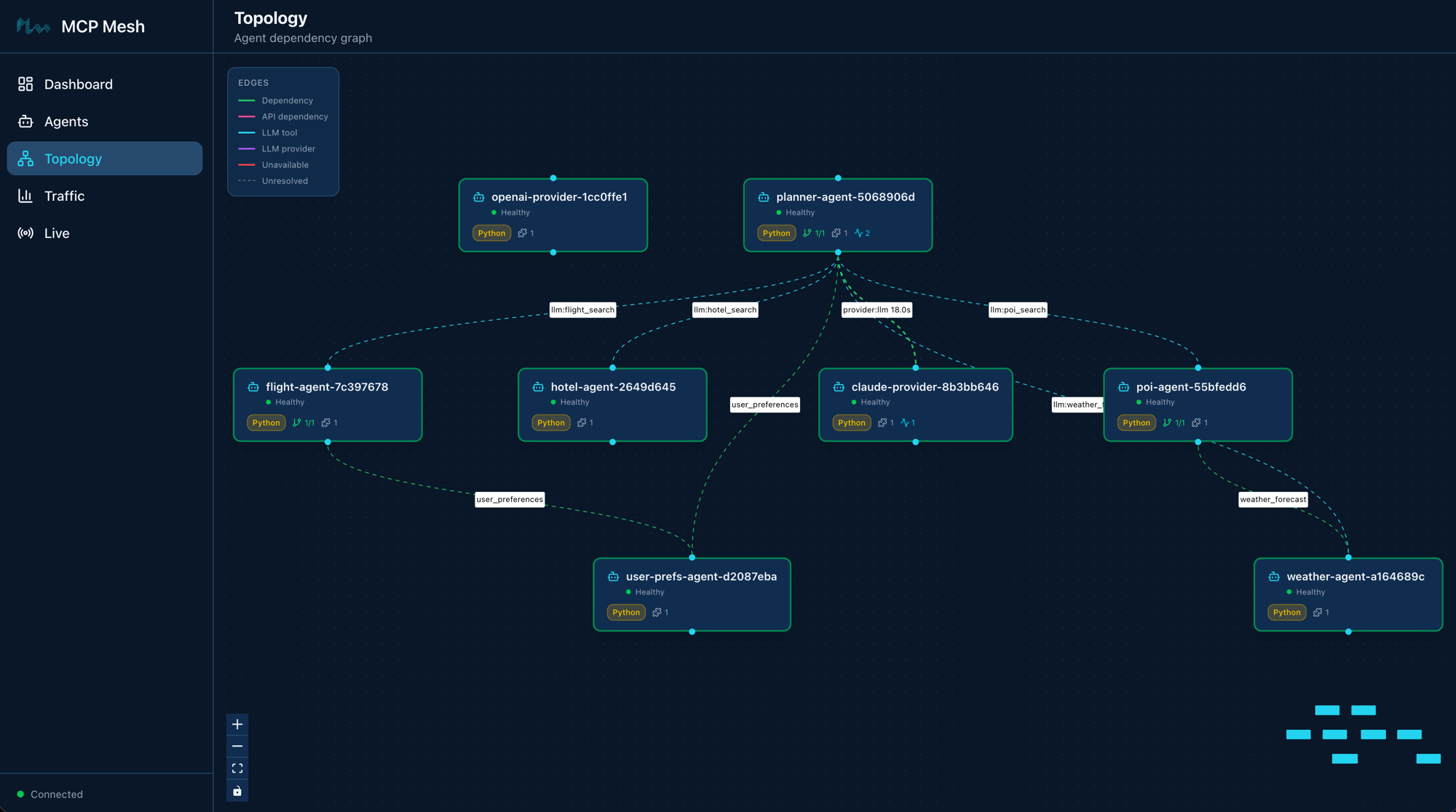
Notice that openai-provider is still healthy and connected to the mesh. The planner routes to claude-provider because of the +claude preference tag — not because OpenAI is unavailable. Both providers are ready; mesh picks the preferred one.
Three calls, three traces, two different providers. The planner's code didn't change once.
Part 4: Connect the planner to tool agents
On Day 3, the planner generated itineraries from the LLM's training data -- no real flight prices, no actual hotel availability. Today you'll connect it to your tool agents using two dependency mechanisms.
Tier-1: prefetch dependencies
Tier-1 dependencies are fetched before the LLM call. Your code calls them explicitly and injects the results into the prompt context. The LLM always sees this data.
For the planner, that's user_preferences -- fetch the user's travel preferences and include them in every prompt:
This is the same dependencies=[...] syntax from Day 2. The user_prefs parameter is injected by mesh DI, just like flight-agent gets its user_prefs dependency. The planner calls it before the LLM call and formats the result into a preferences summary string.
Tier-2: LLM-discoverable tools
Tier-2 tools are made available to the LLM during its reasoning loop. The LLM discovers them via their schemas and decides which to call based on the user's question. You don't call them -- the LLM does.
    filter=[
        {"capability": "flight_search"},
        {"capability": "hotel_search"},
        {"capability": "weather_forecast"},
        {"capability": "poi_search"},
    ],
    filter_mode="all",
    max_iterations=10,
The filter parameter tells the registry which tools to expose to the LLM:
{"capability": "flight_search"}-- flights{"capability": "hotel_search"}-- hotels{"capability": "weather_forecast"}-- weather{"capability": "poi_search"}-- points of interest
filter_mode="all" means include every matching tool (not just the best match per capability). max_iterations=10 gives the LLM up to 10 rounds of tool calling -- enough to search flights, check hotels, look up weather, and find attractions in a single planning session.
The two tiers together
Here is the updated planner with both tiers:
@app.tool()
@mesh.llm(
    system_prompt="file://prompts/plan_trip.j2",
    context_param="ctx",
    provider={"capability": "llm", "tags": ["+claude"]},
    filter=[
        {"capability": "flight_search"},
        {"capability": "hotel_search"},
        {"capability": "weather_forecast"},
        {"capability": "poi_search"},
    ],
    filter_mode="all",
    max_iterations=10,
)
@mesh.tool(
    capability="trip_planning",
    description="Generate a trip itinerary using an LLM with real travel data",
    tags=["planner", "travel", "llm"],
    dependencies=["user_preferences"],
)
async def plan_trip(
    destination: str,
    dates: str,
    budget: str,
    user_prefs: mesh.McpMeshTool = None,
    ctx: TripRequest = None,
    llm: mesh.MeshLlmAgent = None,
) -> str:
    """Plan a trip given a destination, dates, and budget."""
    # Tier-1: prefetch user preferences before the LLM call
    prefs = {}
    if user_prefs:
        prefs = await user_prefs(user_id="demo-user")

    # Inject preferences into the context so the Jinja template can use them
    prefs_summary = (
        f"Preferred airlines: {', '.join(prefs.get('preferred_airlines', []))}. "
        f"Budget limit: ${prefs.get('budget_usd', 'flexible')}. "
        f"Interests: {', '.join(prefs.get('interests', []))}. "
        f"Minimum hotel stars: {prefs.get('hotel_min_stars', 'any')}."
        if prefs
        else "No user preferences available."
    )

    # Tier-2: the LLM will discover and call flight_search, hotel_search,
    # get_weather, and search_pois during its reasoning loop
    result = await llm(
        f"Plan a trip to {destination} from {dates} with a budget of {budget}.",
        context={"user_preferences": prefs_summary},
    )
    return result
The execution flow:
- Tier-1:
user_prefsis called explicitly. The result is formatted and passed ascontext={"user_preferences": prefs_summary}to the LLM call. The Jinja template renders it into the system prompt. - Tier-2:
flight_search,hotel_search,get_weather,search_poisare presented to the LLM as callable tools. The LLM decides which to call duringawait llm(...).
The distinction matters:
- Tier-1 runs before the LLM, every time. You control what data the LLM sees. User preferences are always in the prompt.
- Tier-2 runs during the LLM's reasoning. The LLM chooses whether to search for flights or just answer from training data. You control which tools are available; the LLM controls which ones to use.
The updated prompt template
The Jinja template now includes user preferences:
You are a travel planner. Given a destination, travel dates, and budget,
create a concise day-by-day itinerary.

Destination: {{ destination }}
Dates: {{ dates }}
Budget: {{ budget }}

{% if user_preferences %}
User Preferences:
{{ user_preferences }}
{% endif %}

Guidelines:
- Use the available tools to look up real flight prices, hotel availability,
  weather forecasts, and points of interest. Base your plan on actual data
  rather than guessing.
- Suggest specific activities for each day (morning, afternoon, evening).
- Include one restaurant recommendation per day.
- Stay within the stated budget for the entire trip.
- Keep the plan practical — account for travel time between locations.
- Respect the user's preferences when choosing airlines, hotels, and activities.
The new guidelines tell the LLM to use the available tools for real data rather than guessing. The {{ user_preferences }} variable is populated from the tier-1 prefetch.
Part 5: Call the enhanced planner
With all eight agents running:
$ meshctl call plan_trip '{"destination":"Kyoto","dates":"June 1-5, 2026","budget":"$2000"}' --trace
The response now includes real data from your tool agents -- flight prices from flight-agent, hotel options from hotel-agent, weather from weather-agent, and attractions from poi-agent. The LLM weaves this data into a coherent itinerary, respecting the user's preferences (preferred airlines, minimum hotel stars, interests).
Part 6: Walk the trace
└─ plan_trip (planner-agent) [18349ms] ✓
   ├─ get_user_prefs (user-prefs-agent) [1ms] ✓
   └─ claude_provider (claude-provider) [18308ms] ✓
      ├─ search_pois (poi-agent) [31ms] ✓
      │  └─ get_weather (weather-agent) [1ms] ✓
      ├─ get_weather (weather-agent) [0ms] ✓
      ├─ get_weather (weather-agent) [0ms] ✓
      └─ hotel_search (hotel-agent) [1ms] ✓
This is the most complex trace in the tutorial so far. Read it top to bottom:
plan_trip (planner-agent)-- the entry point. Receives the user's request.get_user_prefs (user-prefs-agent)-- tier-1 prefetch. The planner's code calls this explicitly before the LLM. Takes 1ms. User preferences are now in the prompt context.claude_provider (claude-provider)-- the LLM call. The planner sends the rendered prompt (with user preferences baked in) plus the user message to Claude.search_pois,get_weather,hotel_search-- tier-2 tool calls. Claude decided to call these tools during its reasoning loop. Each tool call appears as a child span underclaude_provider. Notice thatsearch_poistriggers its own DI call toget_weather(from Day 2) -- the dependency chain is fully traced.
The planner's total time (~18 seconds) is mostly Claude's inference. The mesh overhead -- discovering tools, routing to providers, serializing requests -- adds single-digit milliseconds.
Trace depth
The trace tree can go multiple levels deep. plan_trip calls claude_provider, which calls search_pois, which calls get_weather. Each hop is a separate span, linked by trace context that propagates automatically across mesh calls. You get this for free -- no manual instrumentation.
Leave it running
Your eight agents are running in watch mode. On Day 5 you'll add an HTTP gateway. No need to stop between chapters.
Troubleshooting
OPENAI_API_KEY not set. The openai-provider agent needs an OpenAI API key. Set it in your environment:
If the key is missing, the provider will start but LLM calls routed to it will fail with an authentication error.
Provider swap doesn't work. Both providers must have the same capability name ("llm"). Check with meshctl list --tools -- both claude_provider and openai_provider should show capability llm. If one shows a different capability, update the capability parameter in @mesh.llm_provider.
Tool calls not appearing in trace. Check two things:
- The planner's
filterparameter lists the correct capabilities (flight_search,hotel_search, etc.). max_iterationsis high enough (10 is good). If set to 1, the LLM gets one shot and may not call any tools.
Planner returns a generic plan without real data. The LLM didn't call the tier-2 tools. This can happen if:
- The
filtercapabilities don't match any registered tools. Verify withmeshctl list --tools. - The system prompt doesn't instruct the LLM to use tools. Check that
plan_trip.j2includes the guideline about using available tools. filter_modeis set to something other than"all". Use"all"to expose all matching tools.
Tier-1 prefetch not working. Check that user-prefs-agent is running and the planner shows 1/1 in the DEPS column of meshctl list. If it shows 0/1, the dependency hasn't resolved yet -- wait a few seconds and check again.
Recap
You added a provider, swapped it with zero code changes, and connected the planner to real data sources. The planner's code changed in two places: a tag preference and a dependency list. Everything else -- failover, tool discovery, trace propagation -- happened at runtime.
See also
meshctl man tags-- the full tag matching reference, including+/-operators and scoringmeshctl man llm-- the@mesh.llmdecorator reference, includingfilter,filter_mode, andmax_iterationsmeshctl man capabilities-- capability selectors and how they compose with tags and versions
Next up
Day 5 wraps the trip planner in a FastAPI gateway, exposing it as a REST API with @mesh.route. Five lines of code, zero business logic in the gateway -- just HTTP to mesh and back.