Day 3 -- Observability and LLM Integration
On Day 2 you built five tool agents with dependency injection. Today you'll restart them with distributed tracing enabled, add an LLM provider, and build your first agent that can reason -- a trip planner that generates itineraries from natural language.
What we're building today
graph LR
    FA[flight-agent] -->|depends on| UPA[user-prefs-agent]
    PA[poi-agent] -->|depends on| WA[weather-agent]
    HA[hotel-agent]
    PL[planner-agent] -->|uses LLM| CP[claude-provider]

    style FA fill:#4a9eff,color:#fff
    style PA fill:#4a9eff,color:#fff
    style UPA fill:#1a8a4a,color:#fff
    style WA fill:#1a8a4a,color:#fff
    style HA fill:#1a8a4a,color:#fff
    style CP fill:#9b59b6,color:#fff
    style PL fill:#9b59b6,color:#fff
Seven agents. The five you already know (blue and green) plus two new ones in purple: claude-provider wraps the Claude API as a mesh capability, and planner-agent consumes that capability to generate trip itineraries. The planner connects to the provider through the same capability-based discovery that flight-agent uses to find user-prefs-agent -- no hardcoded URLs, no model-specific code in the planner.
Today has five parts:
- Set up distributed tracing -- Redis, Tempo, Grafana via Docker Compose
- Register an LLM provider -- wrap Claude as a mesh capability
- Build the planner agent -- consume the LLM via prompt templates
- Call the planner -- generate a Kyoto itinerary
- Walk the trace -- see the full call tree across agents
Part 1: Set up distributed tracing
Mesh agents publish trace events to Redis. The registry consumes those events and exports them to Tempo. You view traces with meshctl trace or in Grafana. Before any of that works, you need the observability stack running.
Generate the compose file
This generates a docker-compose.observability.yml with Redis, Tempo, and Grafana, plus the supporting config files (Tempo config, Grafana provisioning).
Start the stack
 Container trip-planner-redis   Started
 Container trip-planner-tempo   Started
 Container trip-planner-grafana Started
Verify everything is healthy:
$ docker compose -f docker-compose.observability.yml ps
NAME                   STATUS
trip-planner-redis     Up (healthy)
trip-planner-tempo     Up (healthy)
trip-planner-grafana   Up (healthy)
Three containers. Redis collects trace events on port 6379, Tempo stores traces on ports 3200 (HTTP) and 4317 (OTLP gRPC), and Grafana serves dashboards on port 3000.
Part 2: Register an LLM provider
API key required
The LLM provider needs an ANTHROPIC_API_KEY environment variable. If you don't have one, create one here and export it: export ANTHROPIC_API_KEY=sk-ant-...
An LLM provider wraps an external LLM API -- Claude, GPT, Gemini -- as a mesh capability. Other agents discover it by capability name, the same way tool agents discover each other. The provider agent is zero-code: the @mesh.llm_provider decorator handles the LiteLLM integration, request parsing, and response formatting.
Scaffold the provider
$ meshctl scaffold --name claude-provider --agent-type llm-provider --model anthropic/claude-sonnet-4-5 --port 9106
Replace the generated main.py with:
import mesh
from fastmcp import FastMCP

app = FastMCP("Claude Provider")


@mesh.llm_provider(
    model="anthropic/claude-sonnet-4-5",
    capability="llm",
    tags=["claude"],
    version="1.0.0",
)
def claude_provider():
    """Zero-code LLM provider. Wraps the Claude API as a mesh capability."""
    pass


@mesh.agent(
    name="claude-provider",
    version="1.0.0",
    description="TripPlanner Claude LLM provider (Day 3)",
    http_port=9106,
    enable_http=True,
    auto_run=True,
)
class ClaudeProviderAgent:
    pass
The decorator does all the work:
model="anthropic/claude-sonnet-4-5"-- the LiteLLM model identifier. LiteLLM routes this to the Anthropic API using yourANTHROPIC_API_KEY.capability="llm"-- the capability name other agents use to discover this provider.tags=["claude"]-- tags for filtering. On Day 4 you'll add GPT and Gemini providers with different tags and select between them.
The function body is pass -- the decorator generates the full implementation.
Start the provider with all Day 2 agents
Day 2 ended with meshctl stop, so start the five tool agents alongside the new provider -- this time with --dte to enable distributed tracing:
$ meshctl start --dte --debug -d -w flight-agent/main.py hotel-agent/main.py weather-agent/main.py poi-agent/main.py user-prefs-agent/main.py claude-provider/main.py
Starting 6 agents in detach: flight-agent, hotel-agent, weather-agent, poi-agent, user-prefs-agent, claude-provider
Logs: ~/.mcp-mesh/logs/<agent>.log
Use 'meshctl logs <agent>' to view or 'meshctl stop' to stop all
Check that all six registered:
$ meshctl list
Registry: running (http://localhost:8000) - 6 healthy

NAME                        RUNTIME   TYPE    STATUS    DEPS   ENDPOINT           AGE   LAST SEEN
claude-provider-a8eb909e    Python    Agent   healthy   0/0    10.0.0.74:65349    5s    0s
flight-agent-be1924a4       Python    Agent   healthy   1/1    10.0.0.74:65350    5s    0s
hotel-agent-f8830ef1        Python    Agent   healthy   0/0    10.0.0.74:65354    5s    0s
poi-agent-801db357          Python    Agent   healthy   1/1    10.0.0.74:65351    5s    0s
user-prefs-agent-bfa9de39   Python    Agent   healthy   0/0    10.0.0.74:65353    5s    0s
weather-agent-0aed0742      Python    Agent   healthy   0/0    10.0.0.74:65355    5s    0s
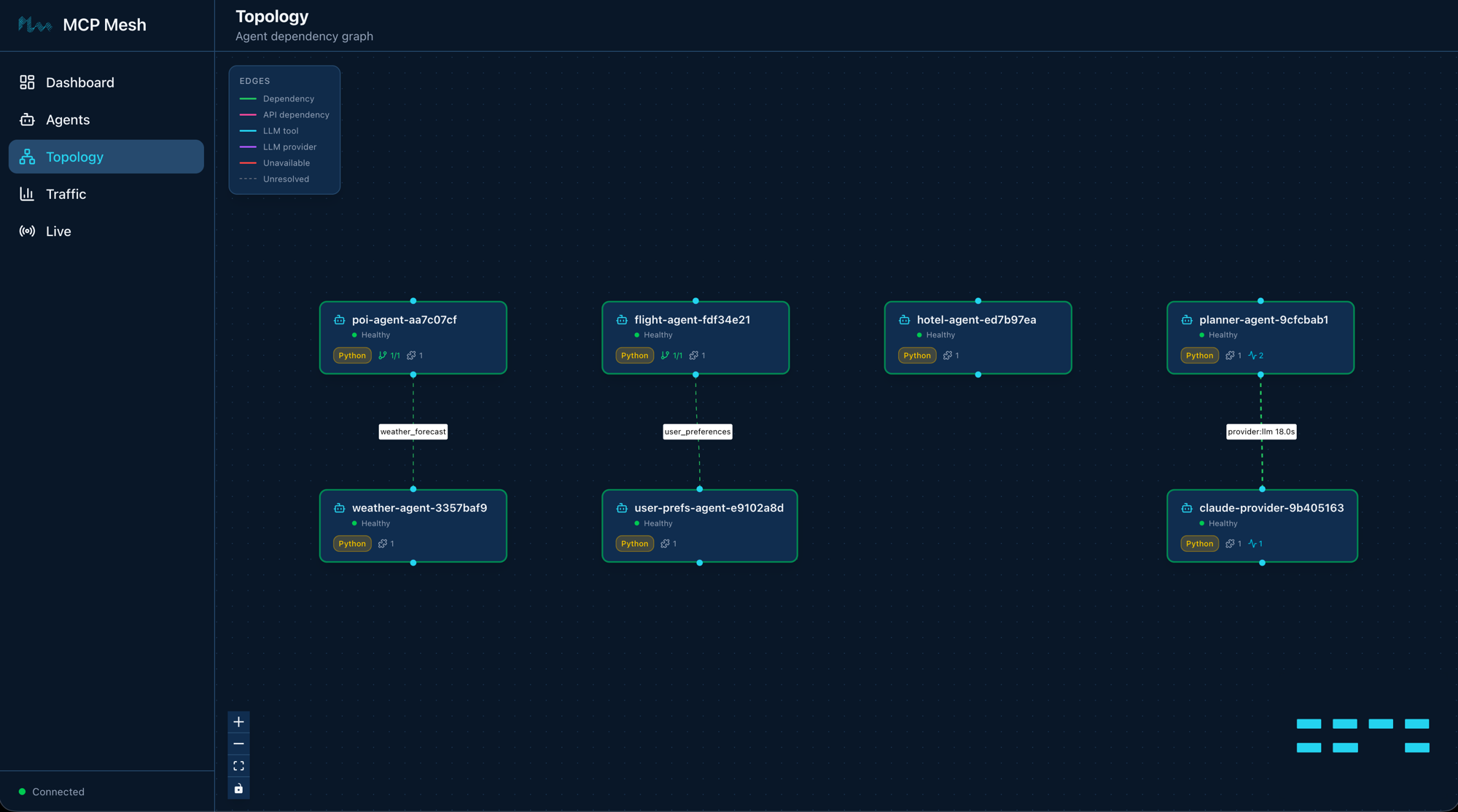
Six agents. The five tool agents from Day 2 plus the new provider. The --dte flag enables distributed tracing for all of them -- every cross-agent call now publishes trace events to Redis.
Part 3: Build the planner agent
The planner agent uses @mesh.llm to consume an LLM capability from the mesh. It takes a destination, dates, and budget, feeds them into a Jinja prompt template, and returns an LLM-generated itinerary.
The prompt template
Create planner-agent/prompts/plan_trip.j2:
You are a travel planner. Given a destination, travel dates, and budget,
create a concise day-by-day itinerary.

Destination: {{ destination }}
Dates: {{ dates }}
Budget: {{ budget }}

Guidelines:
- Suggest specific activities for each day (morning, afternoon, evening).
- Include one restaurant recommendation per day.
- Stay within the stated budget for the entire trip.
- Keep the plan practical — account for travel time between locations.
The template variables -- {{ destination }}, {{ dates }}, {{ budget }} -- are populated from the context model at call time.
The planner code
Scaffold the agent, then replace main.py:
import mesh
from fastmcp import FastMCP
from mesh import MeshContextModel
from pydantic import Field

app = FastMCP("Planner Agent")


class TripRequest(MeshContextModel):
    """Context model for the trip planning prompt template."""

    destination: str = Field(..., description="Travel destination city")
    dates: str = Field(..., description="Travel dates (e.g. June 1-5, 2026)")
    budget: str = Field(..., description="Total trip budget (e.g. $2000)")


@app.tool()
@mesh.llm(
    system_prompt="file://prompts/plan_trip.j2",
    context_param="ctx",
    provider={"capability": "llm"},
)
@mesh.tool(
    capability="trip_planning",
    description="Generate a trip itinerary using an LLM",
    tags=["planner", "travel", "llm"],
)
async def plan_trip(
    destination: str,
    dates: str,
    budget: str,
    ctx: TripRequest = None,
    llm: mesh.MeshLlmAgent = None,
) -> str:
    """Plan a trip given a destination, dates, and budget."""
    result = await llm(
        f"Plan a trip to {destination} from {dates} with a budget of {budget}."
    )
    return result


@mesh.agent(
    name="planner-agent",
    version="1.0.0",
    description="TripPlanner LLM planner (Day 3)",
    http_port=9107,
    enable_http=True,
    auto_run=True,
)
class PlannerAgent:
    pass
Three things to note:
-
TripRequest(MeshContextModel)defines the context fields that map to template variables. Each field becomes a tool parameter and a template variable. -
system_prompt="file://prompts/plan_trip.j2"loads the Jinja template from disk. At call time, mesh renders the template with the context fields and passes the result as the system prompt to the LLM. -
provider={"capability": "llm"}tells mesh to find any agent that advertises thellmcapability. Right now that'sclaude-provider. The planner doesn't know or care which model is behind that capability.
The llm parameter is injected by mesh, just like mesh.McpMeshTool in DI. Calling await llm(...) sends the user message plus the rendered system prompt to the resolved LLM provider.
Start the planner
Check the full mesh:
$ meshctl list
Registry: running (http://localhost:8000) - 7 healthy

NAME                        RUNTIME   TYPE    STATUS    DEPS   ENDPOINT           AGE   LAST SEEN
claude-provider-a8eb909e    Python    Agent   healthy   0/0    10.0.0.74:65349    57s   2s
flight-agent-be1924a4       Python    Agent   healthy   1/1    10.0.0.74:65350    57s   2s
hotel-agent-f8830ef1        Python    Agent   healthy   0/0    10.0.0.74:65354    57s   2s
planner-agent-2efb4dce      Python    Agent   healthy   0/0    10.0.0.74:65352    57s   2s
poi-agent-801db357          Python    Agent   healthy   1/1    10.0.0.74:65351    57s   2s
user-prefs-agent-bfa9de39   Python    Agent   healthy   0/0    10.0.0.74:65353    57s   2s
weather-agent-0aed0742      Python    Agent   healthy   0/0    10.0.0.74:65355    57s   2s
Seven agents. List the tools:
$ meshctl list --tools
TOOL                      AGENT                       CAPABILITY           TAGS
--------------------------------------------------------------------------------------------
claude_provider           claude-provider-a8eb909e    llm                  claude
flight_search             flight-agent-be1924a4       flight_search        flights,travel
get_user_prefs            user-prefs-agent-bfa9de39   user_preferences     preferences,travel
get_weather               weather-agent-0aed0742      weather_forecast     weather,travel
hotel_search              hotel-agent-f8830ef1        hotel_search         hotels,travel
plan_trip                 planner-agent-2efb4dce      trip_planning        planner,travel,llm
search_pois               poi-agent-801db357          poi_search           poi,travel

7 tool(s) found
Seven tools. Notice claude_provider with capability llm and plan_trip with capability trip_planning.
Start the UI
Open http://localhost:3080 to see all seven agents in the dashboard. The two new agents -- claude-provider and planner-agent -- appear alongside the five from Day 2.
Part 4: Call the planner
$ meshctl call plan_trip '{"destination":"Kyoto","dates":"June 1-5, 2026","budget":"$2000"}' --trace
The --trace flag tells meshctl to display the trace ID after the response. The response is an LLM-generated itinerary:
{
  "structuredContent": {
    "result": "# Kyoto Itinerary: June 1-5, 2026 | Budget: $2,000\n\n## Budget Breakdown\n- Accommodation (4 nights): ~$400\n- Food: ~$400\n- Transportation: ~$100\n- Activities: ~$150\n- Reserve: ~$950\n\n## Day 1 - June 1 (Arrival & Eastern Kyoto)\nMorning: Arrive, check in (Gion area). Get ICOCA transit card.\nAfternoon: Kiyomizu-dera Temple -> Ninenzaka & Sannenzaka streets.\nEvening: Stroll through Gion district.\nRestaurant: Gion Kappa - kaiseki sets (~$30-40)\n\n## Day 2 - June 2 (Arashiyama)\nMorning: Bamboo Grove -> Tenryu-ji Temple.\nAfternoon: Monkey Park Iwatayama -> Togetsukyo Bridge.\nEvening: Pontocho Alley.\nRestaurant: Arashiyama Yoshimura - soba (~$15-20)\n\n..."
  },
  "isError": false
}

Trace ID: 2bb20ffe16ff3e03ff356aada9d11947
View trace: meshctl trace 2bb20ffe16ff3e03ff356aada9d11947
Here's the call flow:
meshctl calldiscoversplan_tripvia the registry and sends your JSON arguments toplanner-agent.planner-agentpopulatesTripRequestfrom the arguments, rendersplan_trip.j2withdestination="Kyoto",dates="June 1-5, 2026",budget="$2000", and sets it as the system prompt.await llm(...)resolves thellmcapability toclaude-providerand sends the system prompt plus user message.claude-providercalls the Anthropic API via LiteLLM and returns the generated text.- The itinerary flows back through the planner to your terminal.
You wrote no HTTP client code, no API key management in the planner, no routing logic. The planner knows what it needs (an LLM), not where to find it.
Part 5: Walk the trace
Now that the observability stack is running, you can inspect the full call tree. Copy the trace ID from the output above:
Call Tree for trace 2bb20ffe16ff3e03ff356aada9d11947

└─ plan_trip (planner-agent) [21835ms]
   └─ claude_provider (claude-provider) [21812ms]

Summary: 3 spans across 2 agents | 21.84s
Agents: claude-provider, planner-agent
The trace tree shows exactly what happened:
plan_trip (planner-agent)-- the entry point. Received your JSON arguments, rendered the Jinja template, and delegated to the LLM provider.claude_provider (claude-provider)-- the LLM provider. Received the rendered prompt, called the Anthropic API via LiteLLM, and returned the generated itinerary.
The total time (~22 seconds) is almost entirely Claude's inference time. The mesh overhead -- discovery, routing, serialization -- is in the low milliseconds.
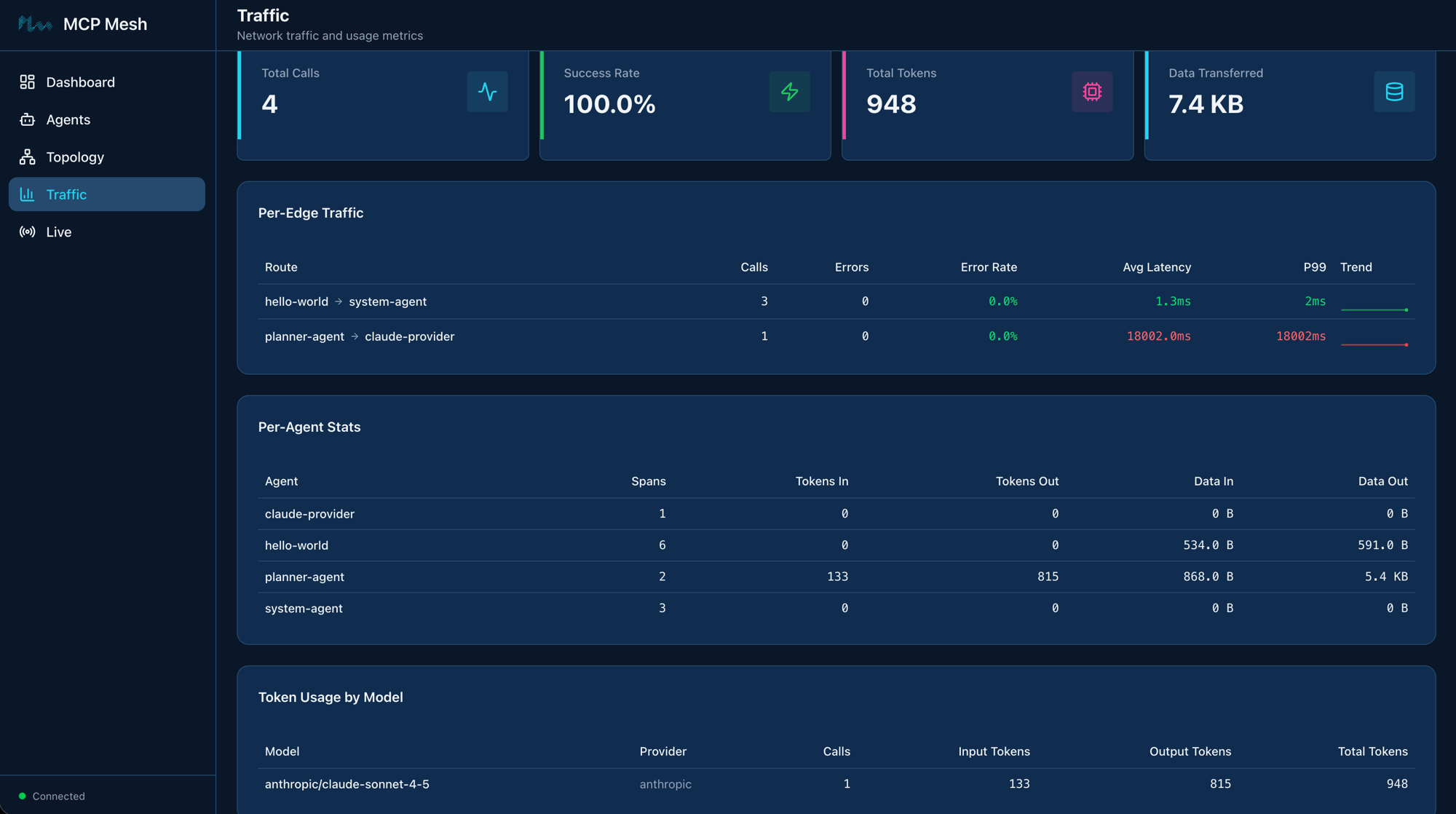
The Traffic page in the mesh UI tracks this automatically -- per-edge latency, error rates, token usage by model, and data transferred per agent. No instrumentation code needed; mesh collects it from the trace data.
In Grafana at http://localhost:3000, you can drill into each span, see request/response payloads, and visualize latency in a waterfall chart. Navigate to Explore and select the Tempo datasource to search for traces.
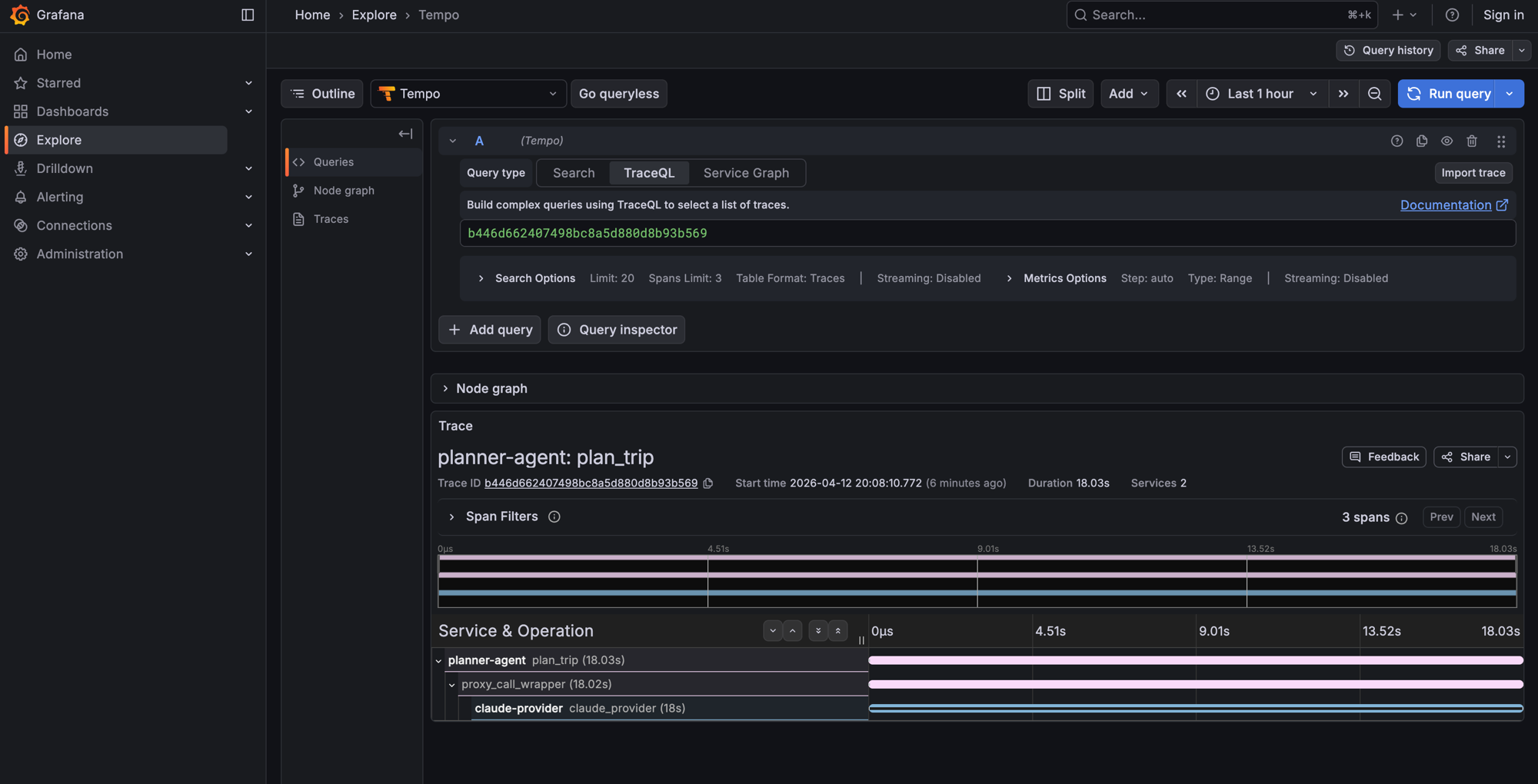
This is the payoff for the observability setup at the start of the chapter. From now on, every meshctl call --trace gives you a trace ID, and meshctl trace <id> shows the full call tree across all agents involved. As your mesh grows, traces will span more agents -- on Day 4 when the planner calls tool agents, the trace tree will show the full chain from planner to LLM to tool agents and back.
Trace propagation
Trace context propagates automatically across mesh calls. When planner-agent calls claude-provider, mesh injects trace headers so the provider's spans link back to the planner's span. You don't need to pass trace IDs manually.
LLM provider abstraction
The planner declares a dependency on the llm capability -- it has no idea it's talking to Claude. On Day 4 you'll add GPT and Gemini providers and swap between them by changing a tag. The planner's code won't change.
Leave it running
From here on, your agents stay running between chapters. On Day 4 you'll add more LLM providers and introduce provider tiers -- just start the new agents with --dte and they join the existing mesh.
Keep the observability stack running too (docker compose stays up). Traces from Day 4 calls will appear in the same Grafana instance.
If you do need to stop for any reason, meshctl stop shuts down all agents, and docker compose -f docker-compose.observability.yml down stops the observability stack.
Troubleshooting
Docker not running / compose fails. The observability stack runs in Docker. Make sure Docker Desktop (or your Docker daemon) is running before docker compose -f docker-compose.observability.yml up -d. If ports 6379, 3200, or 3000 are already in use, stop the conflicting services or change the ports in docker-compose.observability.yml.
ANTHROPIC_API_KEY not set. The claude-provider agent needs an Anthropic API key. Set it in your environment:
If the key is missing, the provider will start but LLM calls will fail with an authentication error.
Traces not appearing. Check two things:
- Agents were started with
--dte(orMCP_MESH_DISTRIBUTED_TRACING_ENABLED=true). - Redis is reachable at
redis://localhost:6379(runredis-cli ping).
If you started agents without --dte, stop them with meshctl stop and restart with the flag.
Observability stack on non-default ports. If you're running Redis, Tempo, or Grafana on non-standard ports (because the defaults are already in use), set the corresponding environment variables before starting agents:
export REDIS_URL=redis://localhost:6380          # default: 6379
export TELEMETRY_ENDPOINT=localhost:4318         # default: 4317
export TEMPO_URL=http://localhost:3201           # default: 3200
meshctl trace returns "trace not found". Traces take a few seconds to propagate from Redis through the registry to Tempo. Wait 5-10 seconds after the call completes, then try again. You can also pass --retries 5 to have meshctl retry automatically.
Recap
You stood up an observability stack (Redis, Tempo, Grafana), registered a zero-code LLM provider, built a planner agent that generates itineraries via prompt templates, and traced the full call tree across agents. The planner consumed the LLM capability the same way flight-agent consumes user_preferences -- by declaring what it needs, not where to find it.
See also
meshctl man llm-- the full LLM integration reference, including@mesh.llm_provider,@mesh.llm, prompt templates, and context modelsmeshctl man observability-- distributed tracing setup, environment variables, and Grafana configurationmeshctl man decorators-- the complete decorator reference
Next up
Day 4 adds a second LLM provider (GPT), introduces tag-based provider selection with automatic failover, and connects the planner to your tool agents so it can look up real flight and hotel data while generating itineraries.