Day 2 — More Tools and Dependency Injection
Yesterday you built one agent. Today you'll build four more, connect them via dependency injection, and see mesh resolve dependencies at runtime. By the end you'll have five agents working together — and you won't have written a single line of networking code.
What we're building today
graph LR
    FA[flight-agent] -->|depends on| UPA[user-prefs-agent]
    PA[poi-agent] -->|depends on| WA[weather-agent]
    HA[hotel-agent]
    UPA
    WA

    style FA fill:#4a9eff,color:#fff
    style PA fill:#4a9eff,color:#fff
    style UPA fill:#1a8a4a,color:#fff
    style WA fill:#1a8a4a,color:#fff
    style HA fill:#1a8a4a,color:#fff
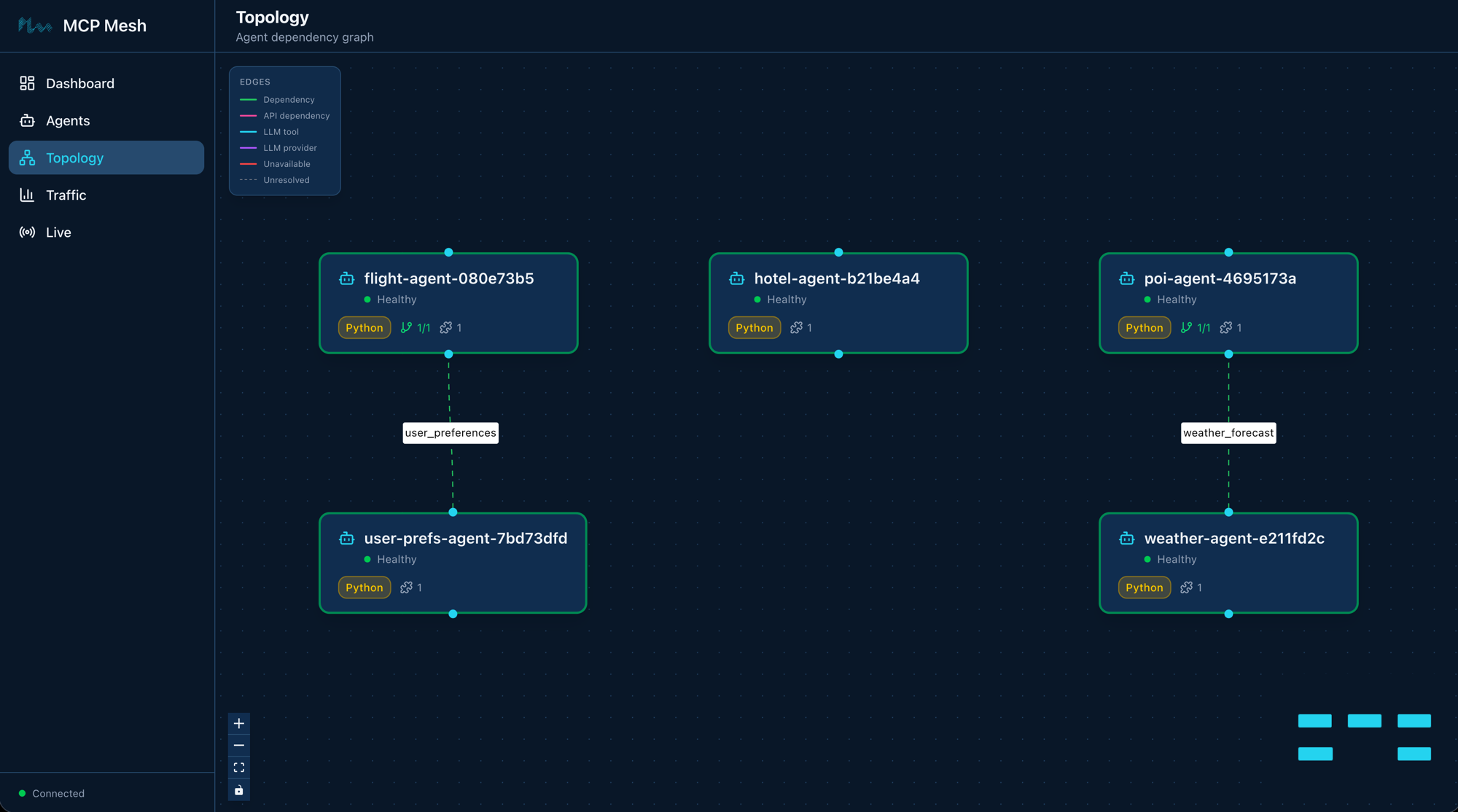
Five agents. Two dependency arrows. flight-agent calls user-prefs-agent to personalize results. poi-agent calls weather-agent to recommend indoor or outdoor activities. The other three — hotel-agent, weather-agent, and user-prefs-agent — are standalone tools with no dependencies.
Step 1: Scaffold the new agents
You know meshctl scaffold from Day 1. Scaffold four new agents:
$ meshctl scaffold --name hotel-agent --agent-type tool --port 9102
$ meshctl scaffold --name weather-agent --agent-type tool --port 9103
$ meshctl scaffold --name poi-agent --agent-type tool --port 9104
$ meshctl scaffold --name user-prefs-agent --agent-type tool --port 9105
Each command creates the same set of files you saw on Day 1: main.py, Dockerfile, helm-values.yaml, and the rest. You'll replace the generated main.py in each directory with the tool implementations below.
Step 2: Write the tools
Standalone tools: hotel, weather, user-prefs
These three agents have no dependencies. Each registers a single tool with the mesh.
hotel-agent — searches for hotels at a destination:
@app.tool()
@mesh.tool(
    capability="hotel_search",
    description="Search for hotels at a destination",
    tags=["hotels", "travel"],
)
async def hotel_search(
    destination: str,
    checkin: str,
    checkout: str,
) -> list[dict]:
    """Return a list of matching hotels. Stub data for Day 2."""
    return [
        {
            "name": "Grand Hyatt",
            "destination": destination,
            "checkin": checkin,
            "checkout": checkout,
            "stars": 5,
            "price_per_night_usd": 320,
            "amenities": ["pool", "spa", "gym"],
        },
        {
            "name": "Sakura Inn",
            "destination": destination,
            "checkin": checkin,
            "checkout": checkout,
            "stars": 3,
            "price_per_night_usd": 95,
            "amenities": ["wifi", "breakfast"],
        },
        {
            "name": "Capsule Stay",
            "destination": destination,
            "checkin": checkin,
            "checkout": checkout,
            "stars": 2,
            "price_per_night_usd": 45,
            "amenities": ["wifi"],
        },
    ]
weather-agent — returns a weather forecast:
@app.tool()
@mesh.tool(
    capability="weather_forecast",
    description="Get weather forecast for a location on a given date",
    tags=["weather", "travel"],
)
async def get_weather(location: str, date: str) -> dict:
    """Return weather forecast. Stub data for Day 2."""
    return {
        "location": location,
        "date": date,
        "condition": "partly_cloudy",
        "high_c": 28,
        "low_c": 19,
        "rain_chance_pct": 30,
        "summary": f"Partly cloudy in {location} on {date}, 28C high, 30% chance of rain.",
    }
user-prefs-agent — returns user travel preferences:
@app.tool()
@mesh.tool(
    capability="user_preferences",
    description="Get user travel preferences",
    tags=["preferences", "travel"],
)
async def get_user_prefs(user_id: str) -> dict:
    """Return user preferences. Stub data for Day 2."""
    return {
        "user_id": user_id,
        "preferred_airlines": ["SQ", "MH"],
        "budget_usd": 1000,
        "interests": ["cultural", "food", "nature"],
        "hotel_min_stars": 3,
    }
All three follow the same pattern from Day 1: @app.tool() + @mesh.tool() with a capability name and tags. No dependencies, no injected parameters.
DI tools: flight-agent (updated) and poi-agent (new)
These two agents depend on other agents' capabilities. This is where dependency injection comes in.
flight-agent — updated from Day 1 to depend on user_preferences:
@app.tool()
@mesh.tool(
    capability="flight_search",
    description="Search for flights between two cities on a given date",
    tags=["flights", "travel"],
    dependencies=["user_preferences"],
)
async def flight_search(
    origin: str,
    destination: str,
    date: str,
    user_prefs: mesh.McpMeshTool = None,
) -> list[dict]:
    """Search flights, personalized with user preferences when available."""
    # Fetch user preferences via dependency injection
    prefs = await user_prefs(user_id="demo-user") if user_prefs else {}

    preferred_airlines = prefs.get("preferred_airlines", [])
    budget = prefs.get("budget_usd", 10000)

    flights = [
        {
            "carrier": "MH",
            "flight": "MH007",
            "origin": origin,
            "destination": destination,
            "date": date,
            "depart": "09:15",
            "arrive": "14:40",
            "price_usd": 842,
        },
        {
            "carrier": "SQ",
            "flight": "SQ017",
            "origin": origin,
            "destination": destination,
            "date": date,
            "depart": "11:50",
            "arrive": "17:05",
            "price_usd": 901,
        },
        {
            "carrier": "AA",
            "flight": "AA100",
            "origin": origin,
            "destination": destination,
            "date": date,
            "depart": "14:30",
            "arrive": "20:15",
            "price_usd": 1150,
        },
    ]

    # Filter by budget
    flights = [f for f in flights if f["price_usd"] <= budget]

    # Sort preferred airlines first
    if preferred_airlines:
        flights.sort(key=lambda f: f["carrier"] not in preferred_airlines)

    return flights
Three things changed from Day 1:
dependencies=["user_preferences"]on@mesh.tooldeclares that this tool needs theuser_preferencescapability at runtime.user_prefs: mesh.McpMeshTool = Noneis the injected parameter. At startup, mesh resolves the dependency by finding an agent that advertisesuser_preferences, creates a proxy, and injects it here.await user_prefs(user_id="demo-user")calls the injected tool like a regular async function. No URL, no REST client, no serialization code — mesh handles all of that behind the proxy.
The function also changed from def to async def — dependency injection calls are async because they cross process boundaries.
poi-agent — depends on weather_forecast:
@app.tool()
@mesh.tool(
    capability="poi_search",
    description="Search for points of interest at a location",
    tags=["poi", "travel"],
    dependencies=["weather_forecast"],
)
async def search_pois(
    location: str,
    weather: mesh.McpMeshTool = None,
) -> dict:
    """Find points of interest, adjusted for weather conditions."""
    # Fetch weather via dependency injection
    forecast = await weather(location=location, date="today") if weather else {}

    rain_chance = forecast.get("rain_chance_pct", 0)
    prefer_indoor = rain_chance > 50

    outdoor_pois = [
        {"name": "Senso-ji Temple", "type": "outdoor", "category": "cultural"},
        {"name": "Ueno Park", "type": "outdoor", "category": "nature"},
        {"name": "Meiji Shrine", "type": "outdoor", "category": "cultural"},
    ]
    indoor_pois = [
        {"name": "TeamLab Borderless", "type": "indoor", "category": "art"},
        {"name": "Tokyo National Museum", "type": "indoor", "category": "museum"},
        {"name": "Akihabara Arcades", "type": "indoor", "category": "entertainment"},
    ]

    if prefer_indoor:
        pois = indoor_pois + outdoor_pois[:1]
        recommendation = "Rain likely — mostly indoor activities recommended."
    else:
        pois = outdoor_pois + indoor_pois[:1]
        recommendation = "Weather looks good — outdoor activities recommended."

    for poi in pois:
        poi["location"] = location

    return {
        "location": location,
        "weather_summary": forecast.get("summary", "unknown"),
        "recommendation": recommendation,
        "pois": pois,
    }
Same pattern: declare the dependency in @mesh.tool, accept an mesh.McpMeshTool parameter, and call it with await. The search_pois function fetches the weather forecast, checks the rain chance, and adjusts its recommendations — indoor activities if rain is likely, outdoor otherwise.
Here's the complete flight-agent/main.py for reference:
import mesh
from fastmcp import FastMCP

app = FastMCP("Flight Agent")


@app.tool()
@mesh.tool(
    capability="flight_search",
    description="Search for flights between two cities on a given date",
    tags=["flights", "travel"],
    dependencies=["user_preferences"],
)
async def flight_search(
    origin: str,
    destination: str,
    date: str,
    user_prefs: mesh.McpMeshTool = None,
) -> list[dict]:
    """Search flights, personalized with user preferences when available."""
    # Fetch user preferences via dependency injection
    prefs = await user_prefs(user_id="demo-user") if user_prefs else {}

    preferred_airlines = prefs.get("preferred_airlines", [])
    budget = prefs.get("budget_usd", 10000)

    flights = [
        {
            "carrier": "MH",
            "flight": "MH007",
            "origin": origin,
            "destination": destination,
            "date": date,
            "depart": "09:15",
            "arrive": "14:40",
            "price_usd": 842,
        },
        {
            "carrier": "SQ",
            "flight": "SQ017",
            "origin": origin,
            "destination": destination,
            "date": date,
            "depart": "11:50",
            "arrive": "17:05",
            "price_usd": 901,
        },
        {
            "carrier": "AA",
            "flight": "AA100",
            "origin": origin,
            "destination": destination,
            "date": date,
            "depart": "14:30",
            "arrive": "20:15",
            "price_usd": 1150,
        },
    ]

    # Filter by budget
    flights = [f for f in flights if f["price_usd"] <= budget]

    # Sort preferred airlines first
    if preferred_airlines:
        flights.sort(key=lambda f: f["carrier"] not in preferred_airlines)

    return flights


@mesh.agent(
    name="flight-agent",
    version="1.0.0",
    description="TripPlanner flight search tool (Day 2)",
    http_port=9101,
    enable_http=True,
    auto_run=True,
)
class FlightAgent:
    pass
Step 3: Start all agents
Start all five with one command:
$ meshctl start --debug -d -w flight-agent/main.py hotel-agent/main.py weather-agent/main.py poi-agent/main.py user-prefs-agent/main.py
Validating prerequisites...
  Using virtual environment: /tmp/trip-planner-day2/.venv/bin/python
  All prerequisites validated successfully
   Python: 3.11.14 (/tmp/trip-planner-day2/.venv/bin/python)
   Virtual environment: .venv
Starting 5 agents in detach: flight-agent, hotel-agent, weather-agent, poi-agent, user-prefs-agent
Logs: ~/.mcp-mesh/logs/<agent>.log
Use 'meshctl logs <agent>' to view or 'meshctl stop' to stop all
The -w flag means mesh is watching your agent files — edit any main.py, save it, and mesh restarts that agent automatically. Combined with -d (detach) and --debug (verbose logs), this gives you a tight development loop: edit, save, call, see results.
Here's what each flag does:
--debug— verbose logging. Useful for seeing dependency resolution.-d— detach mode. All five agents run in the background.-w— watch mode. Monitors agent directories and auto-restarts on changes.
If no registry is running, meshctl starts one automatically, same as Day 1.
Step 4: Start the UI
The dashboard is at http://localhost:3080. You'll see all five agents listed.
Step 5: Inspect the mesh
$ meshctl list
Registry: running (http://localhost:8000) - 5 healthy

NAME                        RUNTIME   TYPE    STATUS    DEPS   ENDPOINT           AGE   LAST SEEN
flight-agent-835864a0       Python    Agent   healthy   1/1    10.0.0.74:63297    5s    5s
hotel-agent-eb0eb637        Python    Agent   healthy   0/0    10.0.0.74:63298    5s    5s
poi-agent-5923d848          Python    Agent   healthy   1/1    10.0.0.74:63295    5s    5s
user-prefs-agent-950b70c3   Python    Agent   healthy   0/0    10.0.0.74:63294    5s    5s
weather-agent-1760466a      Python    Agent   healthy   0/0    10.0.0.74:63296    5s    5s
Notice the DEPS column. flight-agent shows 1/1 — one dependency declared, one resolved. poi-agent also shows 1/1. The others show 0/0. When all dependencies are resolved, the agent is fully operational.
List the tools:
$ meshctl list --tools
TOOL              AGENT                       CAPABILITY         TAGS
flight_search     flight-agent-835864a0       flight_search      flights,travel
get_user_prefs    user-prefs-agent-950b70c3   user_preferences   preferences,travel
get_weather       weather-agent-1760466a      weather_forecast   weather,travel
hotel_search      hotel-agent-eb0eb637        hotel_search       hotels,travel
search_pois       poi-agent-5923d848          poi_search         poi,travel

5 tool(s) found
Five tools across five agents. Each tool's capability name is how other agents find it via dependency injection.
Step 6: Call a tool with dependency injection
Call flight_search. This triggers a cross-agent call — flight-agent calls user-prefs-agent behind the scenes to fetch user preferences:
The response includes personalized results. The stub preferences set a budget of $1000 and prefer SQ and MH airlines, so the $1150 AA flight is filtered out, and the preferred carriers sort first:
{
  "_meta": {
    "fastmcp": {
      "wrap_result": true
    }
  },
  "content": [
    {
      "type": "text",
      "text": "[{\"carrier\":\"MH\",\"flight\":\"MH007\",\"origin\":\"SFO\",\"destination\":\"NRT\",\"date\":\"2026-06-01\",\"depart\":\"09:15\",\"arrive\":\"14:40\",\"price_usd\":842},{\"carrier\":\"SQ\",\"flight\":\"SQ017\",\"origin\":\"SFO\",\"destination\":\"NRT\",\"date\":\"2026-06-01\",\"depart\":\"11:50\",\"arrive\":\"17:05\",\"price_usd\":901}]"
    }
  ],
  "structuredContent": {
    "result": [
      {
        "carrier": "MH",
        "flight": "MH007",
        "origin": "SFO",
        "destination": "NRT",
        "date": "2026-06-01",
        "depart": "09:15",
        "arrive": "14:40",
        "price_usd": 842
      },
      {
        "carrier": "SQ",
        "flight": "SQ017",
        "origin": "SFO",
        "destination": "NRT",
        "date": "2026-06-01",
        "depart": "11:50",
        "arrive": "17:05",
        "price_usd": 901
      }
    ]
  },
  "isError": false
}
Now call search_pois. This triggers poi-agent calling weather-agent:
{
  "content": [
    {
      "type": "text",
      "text": "{\"location\":\"Tokyo\",\"weather_summary\":\"Partly cloudy in Tokyo on today, 28C high, 30% chance of rain.\",\"recommendation\":\"Weather looks good — outdoor activities recommended.\",\"pois\":[{\"name\":\"Senso-ji Temple\",\"type\":\"outdoor\",\"category\":\"cultural\",\"location\":\"Tokyo\"},{\"name\":\"Ueno Park\",\"type\":\"outdoor\",\"category\":\"nature\",\"location\":\"Tokyo\"},{\"name\":\"Meiji Shrine\",\"type\":\"outdoor\",\"category\":\"cultural\",\"location\":\"Tokyo\"},{\"name\":\"TeamLab Borderless\",\"type\":\"indoor\",\"category\":\"art\",\"location\":\"Tokyo\"}]}"
    }
  ],
  "structuredContent": {
    "location": "Tokyo",
    "weather_summary": "Partly cloudy in Tokyo on today, 28C high, 30% chance of rain.",
    "recommendation": "Weather looks good — outdoor activities recommended.",
    "pois": [
      {"name": "Senso-ji Temple", "type": "outdoor", "category": "cultural", "location": "Tokyo"},
      {"name": "Ueno Park", "type": "outdoor", "category": "nature", "location": "Tokyo"},
      {"name": "Meiji Shrine", "type": "outdoor", "category": "cultural", "location": "Tokyo"},
      {"name": "TeamLab Borderless", "type": "indoor", "category": "art", "location": "Tokyo"}
    ]
  },
  "isError": false
}
The 30% rain chance is below the 50% threshold, so poi-agent recommends outdoor activities. Change the stub data in weather-agent to return 80% rain chance, save the file (watch mode restarts it automatically), and call again — you'll get indoor recommendations instead.
meshctl DX — watch mode
Edit your flight_search function, save the file, and mesh auto-restarts the agent. No manual stop/start cycle. Combined with -d, you get a development loop that feels like editing a local script — change, save, call, see results.
What is DDDI?
Your flight_search function calls user_prefs() like a local function. It has no idea that user_prefs lives in a different process, possibly on a different machine. mesh resolved the dependency by matching the user_preferences capability name, injected a proxy that handles the network call, and your code stayed clean. That's Distributed Dynamic Dependency Injection — DDDI.
Stop and clean up
On Day 3 you'll restart with distributed tracing enabled — the agents need the --dte flag to publish trace events, so a fresh start is needed.
Troubleshooting
"Dependency not resolved" — agent shows 0/1 in DEPS column. This means the agent that provides the required capability hasn't registered yet. mesh doesn't crash — the dependent agent starts and waits. Once the provider agent registers, mesh resolves the dependency and the DEPS column updates to 1/1. If you start agents one at a time, you may see this briefly. Starting all agents together (as in Step 3) avoids it in practice.
DI call returns empty dict instead of preferences. Check that user_prefs is not None. The if user_prefs else {} guard in the function handles the case where the dependency wasn't resolved. If it's consistently None, check meshctl status flight-agent to verify the dependency is resolved.
Watch mode doesn't pick up changes. Verify that the file you edited is in the same directory that meshctl start is watching. Watch mode monitors the directory of the main.py file you passed to meshctl start.
Agent ports change on every restart. When using -w (watch mode), meshctl starts agents with the HTTP port set to 0 — the OS assigns a random available port. This is intentional: when watch mode restarts an agent after a code change, the old process needs to release its port before the new one starts. Since mesh discovers agents by capability name through the registry (not by URL), the actual port number doesn't matter. meshctl call and dependency injection both resolve endpoints via the registry, so everything works regardless of which port an agent lands on.
Recap
You built five agents, connected two of them via dependency injection, and called tools that trigger cross-agent calls. The total networking code you wrote: zero lines. The dependency injection, service discovery, and proxy creation all happened at runtime — declared in decorators, resolved by mesh.
See also
meshctl man dependency-injection— the full DI reference, including tag-based dependency matching and multi-dependency patternsmeshctl man capabilities— how capabilities and tags work together for service discoverymeshctl man cli— full CLI reference forstart,list,call,status,stop
Next up
Day 3 sets up the observability stack for distributed tracing, then adds an LLM provider agent and a planner — your first agent that can reason, not just return data.